
The sales call went perfectly. The prospect said yes, agreed to your scope, and was eager to get started.
Then everything ground to a halt.
Two days passed while your team drafted the contract. Another three days were lost because the client had a question about an invoice sent from a different platform. By the time the kickoff call actually happened, the initial momentum was gone, replaced by administrative friction and early buyer’s remorse.
Most service businesses, agencies, and consultants don’t have a delivery problem—they have an onboarding problem. They treat client onboarding as a series of disconnected administrative tasks rather than a unified workflow.
When you automate your client onboarding process, you don’t just save internal admin hours. You eliminate the friction between a client saying “yes” and your team delivering actual value.
Here is how to build an automated client onboarding process that closes the gap between closed-won sales and active project execution.
The True Cost of Manual Client Onboarding
Manual onboarding relies on human memory and disjointed software tools. The typical manual handoff looks like this:
- Send a proposal via email or a presentation link.
- Wait for verbal approval, then manually draft a contract in a word processing app.
- Export to PDF and upload it to an electronic signature tool.
- Send a separate invoice or payment link through an accounting app.
- Send a manual welcome email with a link to an intake questionnaire once payment clears.
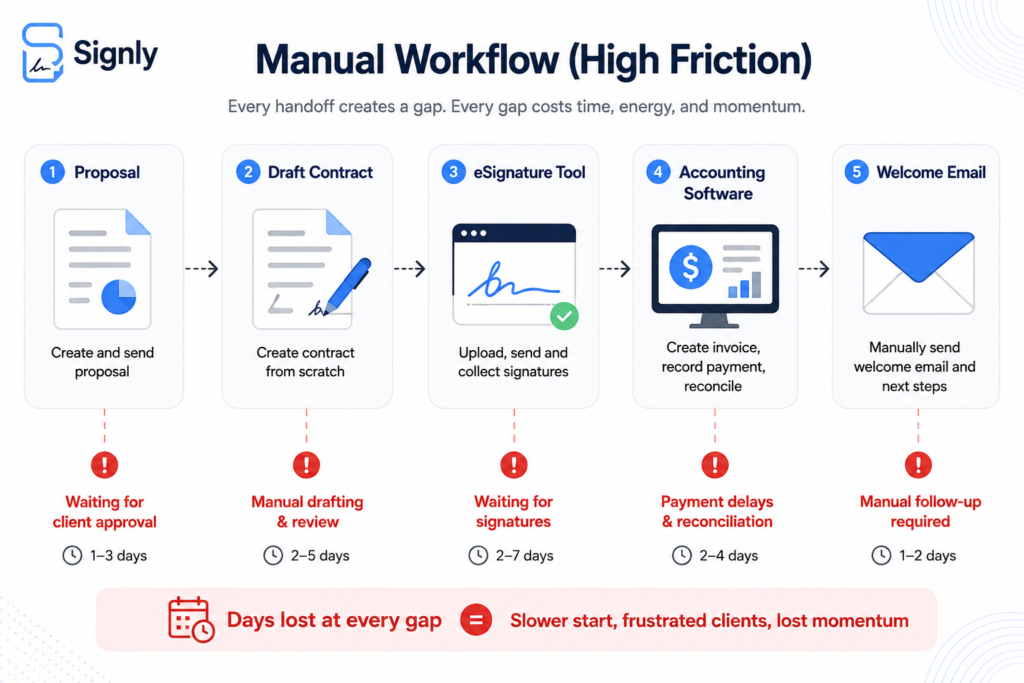
Each step in this chain introduces a waiting period. More importantly, every manual handoff creates a drop-off point where clients re-evaluate their decisions, ask for scope modifications, or simply let emails sit in their inbox.
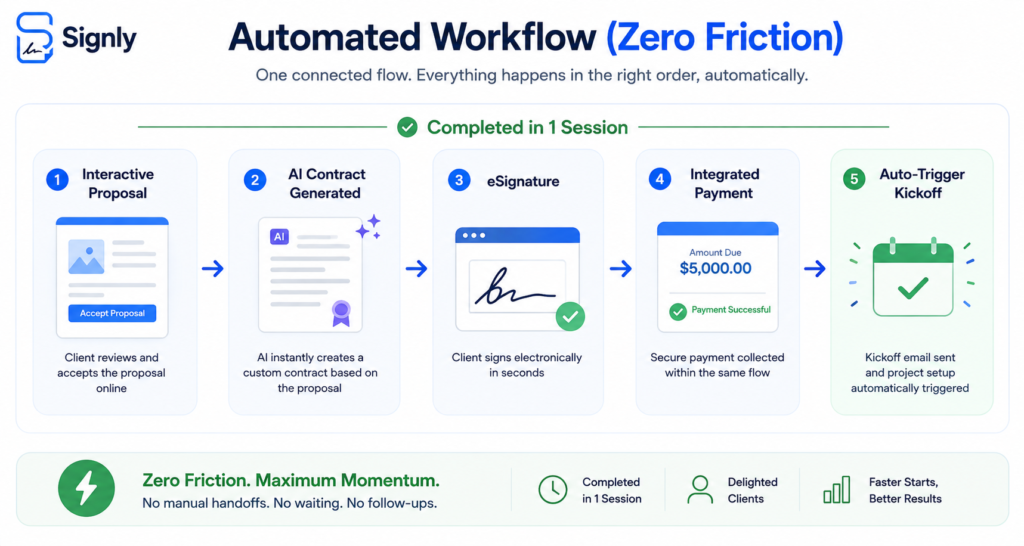
An automated onboarding process collapses these steps into a single, continuous trigger-and-action sequence.
Step 1: Unify the Proposal, Contract, and Payment Sequence
The single biggest delay in onboarding happens between contract signing and deposit collection. Forcing a client to sign a document in one tab and open an invoice link in another is an unnecessary point of friction.
To automate this sequence:
- Use Document Templates: Create pre-approved, dynamic document templates with variable fields (client name, project scope, retainer amount) that auto-fill using CRM data.
- Embed Payments Directly into Contracts: Set your document workflow to require deposit payment at the moment of eSignature execution. The contract cannot be finalized without payment, and the payment cannot be made without signing.
- Leverage AI Contract Generation: Instead of drafting legal agreements from scratch for customized scopes, use AI tools to generate tailored clauses, terms, and milestone schedules based on the initial proposal parameters.
Step 2: Trigger Automated Intake and Data Collection
Once the agreement is executed and the initial payment is confirmed, the system should immediately initiate data collection without staff intervention.
The onboarding momentum drops drastically if a client signs an agreement and then hears nothing for 24 hours. The immediate post-signature window is when client engagement and enthusiasm are highest.
Instead of typing out a “Next Steps” email manually:
- Instant Post-Signature Redirection: Set up an automated redirect that sends the signer immediately to an online intake questionnaire the moment the signature and payment process completes.
- Smart Conditional Intake Forms: Use dynamic forms that show or hide specific fields depending on the services selected in the proposal. For example, if a client purchased a web design package, automatically show fields for domain access and brand guidelines; hide those fields if they only purchased copywriting.
- Automated Asset Upload Workflows: Provide secure cloud upload links directly inside the initial welcome sequence so clients can upload brand kits, access credentials, and reference files without emailing attachments.
- Automated Kickoff Scheduling: Send automated email sequences triggered instantly upon signature, delivering welcome packets and a direct link to schedule the team kickoff call.
Step 3: Streamline Team Collaboration and Client Portals
An automated onboarding system must notify internal teams just as efficiently as it communicates with external clients. Operational handoffs within your internal team are just as prone to delays as client communications.
When a contract clears, the background automation should execute several key actions simultaneously:
- Automate Workspace Creation: Automatically generate a pre-configured client folder directory (e.g., Google Drive or Dropbox) and a dedicated project board from a master template.
- Internal Team Notifications: Send automated alerts to Slack or Microsoft Teams channels alerting team leads that a client has onboarded, complete with the contract terms and intake details.
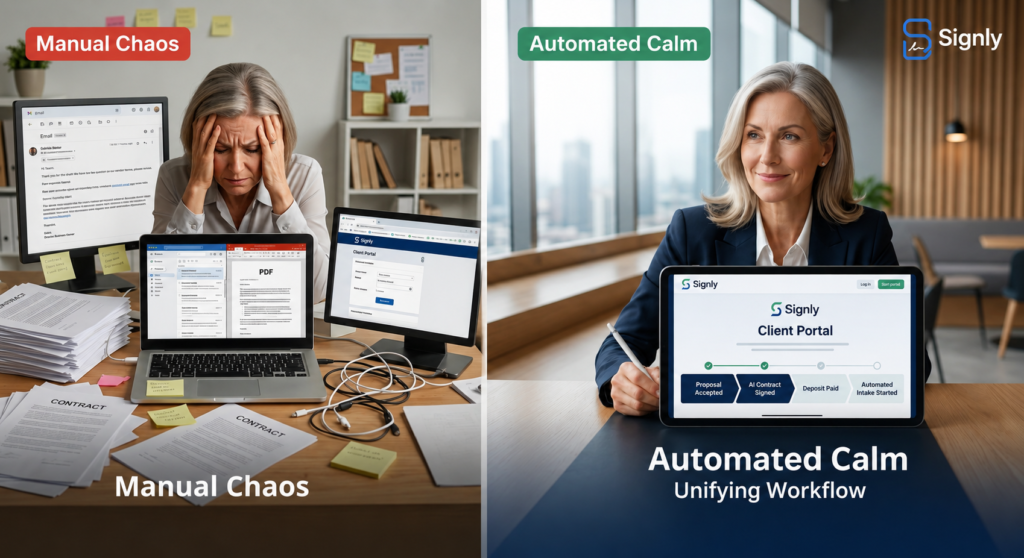
- Client Portal Provisioning: Provide clients with automated access to a centralized dashboard—whether hosted on an operations tool or an all-in-one platform like Vonza—where they can review an audit trail of signed agreements, active milestones, and upcoming payment schedules.
| Task Category | Manual Approach | Automated Approach |
| Agreement Generation | Copy-pasting text into PDFs | AI template auto-fill via scope input |
| Payment Collection | Separate invoice via accounting app | Integrated payment gateway inside contract |
| Project Setup | Manual folder and task creation | Auto-provisioned workspaces via API |
| Follow-ups | Manual email checking and reminders | Automated rule-based notification triggers |
Step 4: Implement Automated Follow-ups and Audit Trails
Clients are busy, and even the most enthusiastic partners miss emails. Manual follow-up—sending emails asking “Did you get a chance to sign this?”—is uncomfortable and time-consuming.
Automated reminder rules handle this neutrally and consistently:
- Conditional Reminders: Configure automated emails to trigger at 24, 48, and 72 hours if a document remains unviewed or unsigned.
- Audit Trail Tracking: Ensure your system logs every step of the process—when the document was opened, IP addresses, eSignature timestamps, and payment transaction IDs. Platforms like Signly and specialized electronic signing engines like Signly Co provide legal protection while giving your operations team visibility into exactly where a client is stuck.
How Signly Automates Your Entire Onboarding Engine
Instead of stitching together a document generator, an eSignature provider, an invoice platform, and an automation engine, Signly handles the complete client onboarding lifecycle within one unified workspace.
Here is how Signly transforms your onboarding operations:
- AI-Powered Contract Creation: Generate customizable, professional agreements and proposals in seconds, ensuring your legal terms match your exact project scope without manual drafting.
- Unified Document & Payment Execution: With Signly, you don’t send an invoice after the contract. You attach deposits, recurring retainers, or milestone payments directly inside the contract workflow. Clients sign and pay in a single seamless experience.
- Automated Reminders and Workflows: Stop tracking pending signatures on spreadsheets. Signly tracks document interactions in real time, auto-sends reminders to signers, and logs detailed, legally binding audit trails aligned with legal standards recognized by authorities such as the Small Business Administration.
- Team Collaboration & Client Experience: Manage templates across your entire agency or team, control permissions, and give clients a clean, branded portal to manage their agreements and invoices.
Practical Takeaways for Your Agency or Business
To automate your client onboarding process starting today:
- Audit your current handoff: Map out every manual step between a verbal “yes” and your kickoff call. Identify where time is lost.
- Combine contract and payment: Stop sending separate legal agreements and invoices. Use a single unified workflow tool.
- Standardize intake through templates: Turn your onboarding questions into structured digital forms triggered immediately upon signature.
- Set automated reminder rules: Let software handle signature follow-ups so your team doesn’t have to monitor document status manually.
Frequently Asked Questions (FAQ)
What is the difference between client onboarding and client intake?
Client intake is the initial gathering of information (questions, assets, access credentials) needed to perform work. Client onboarding is the entire end-to-end framework that includes agreement execution, contract signing, deposit payment, team assignment, intake, and project kickoff.
Is an eSignature collected during an automated onboarding process legally binding?
Yes. Electronic signatures collected with proper authentication, audit trails, and intent to sign are legally binding under global standards, including the ESIGN Act and UETA in the United States and eIDAS in the European Union.
How do I automate client onboarding without losing the personal touch?
Automation handles the administrative infrastructure (contracts, payments, file collection) so your team has more time to deliver high-touch personal value, such as hosting meaningful kickoff strategy sessions and building client relationships. You can review guidelines on governance and digital transaction compliance via resources like the FDIC.
Ready to Streamline Your Client Onboarding?
Stop chasing signatures and manually sending invoices. Upgrade your client experience with an all-in-one proposal, contract, eSignature, and payment platform.
- Looking to learn more? Explore strategic insights on organizational operations published by industry authorities like the Harvard Business Review.
- Ready to elevate your workflow? Discover how Signly can automate your client onboarding and speed up your time-to-payment today.
- Want to start closing faster? Create your free account or book a demo with the Signly Team.



4 thoughts on “How to Automate Your Client Onboarding Process: The Complete Workflow Guide”
Comments are closed.